
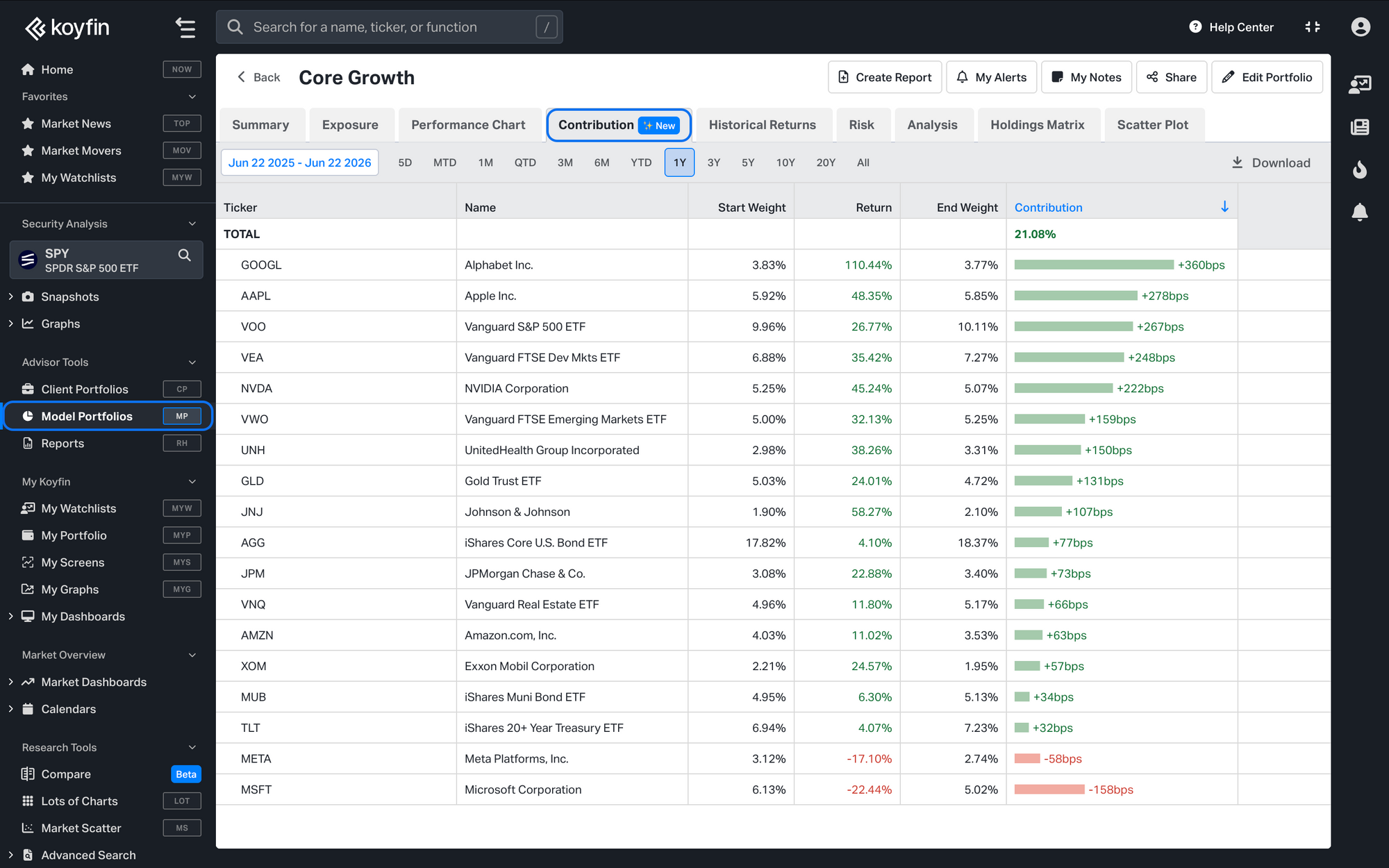
Contribution is a new tab in Model Portfolios that shows how much each holding added to or subtracted from the portfolio's total return over a selected period. It breaks the portfolio's return down position by position, surfacing which holdings drove performance.
Opening the Contribution tab
- Open a Model Portfolio.
- In the analysis bar at the top, select Contribution.
The contribution table
The table lists every holding that was in the portfolio at any point during the selected period, including positions that were later sold. The columns are:
- Start Weight and End Weight: The position's portfolio weight at the start and end of the period.
- Return: The security's total return over the period.
- Contribution: How much of the portfolio's total return came from the position, in basis points. The bar is green for a positive contribution and red for a negative one.
Sleeves: Shows both the Sleeve as an aggregate's contribution to the model and the individual holdings contribution to the model.
Sorting: By default, it is sorted by Contribution from highest to lowest. Click any column header to sort by that column, and click again to reverse the direction.
Downloading the data
Click Download in the top right of the tab to export the table as a CSV.
Plan availability
Model Portfolio Contribution is available on Advisor Pro.